Lines, Flicker, or a Black Screen on Your MacBook or Laptop: Panel, Cable, or Graphics, and What It Costs
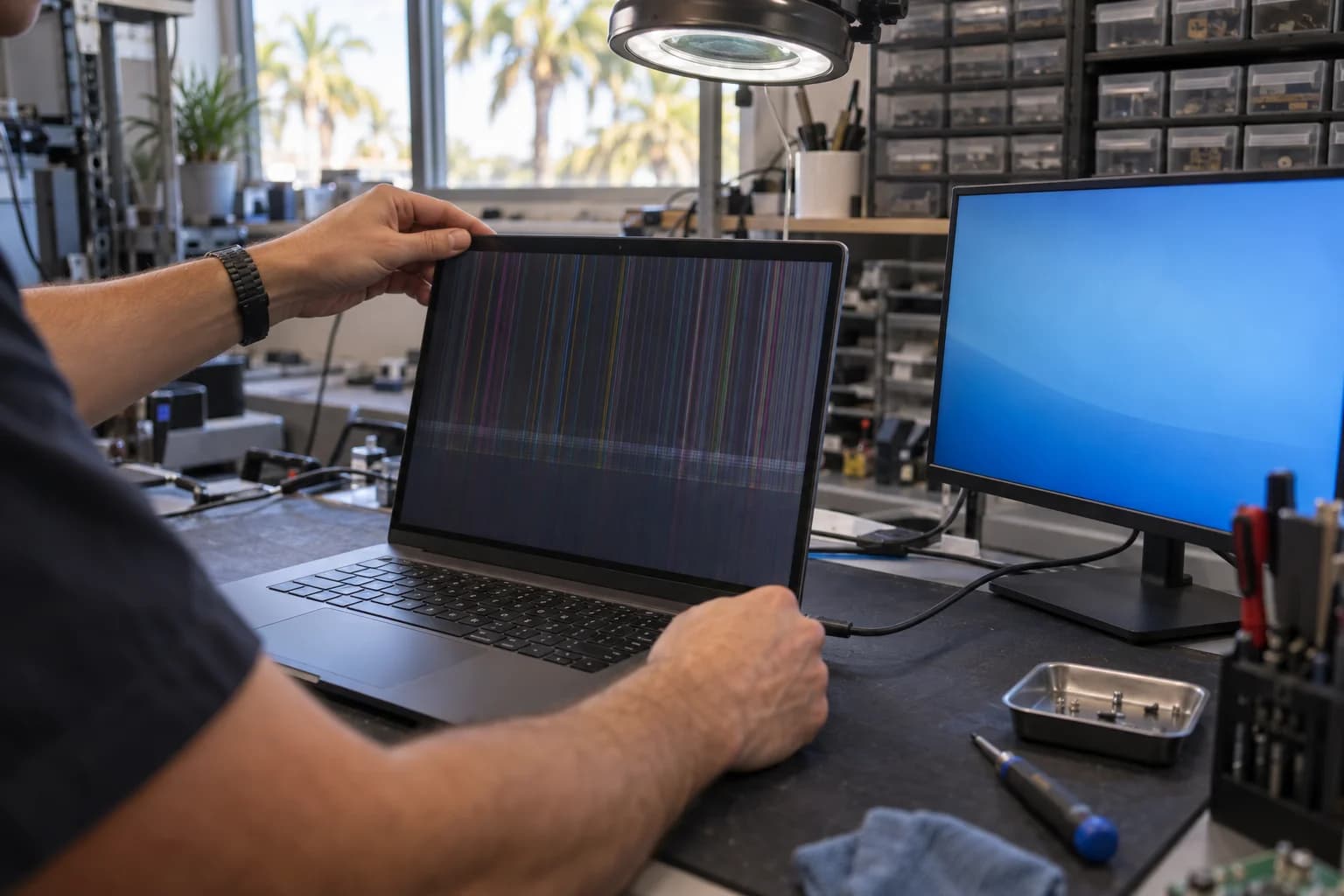
Thin colored lines, a band of flicker, a picture you can only see with a flashlight, or nothing while the fans run. Each comes down to one of three parts: the panel, the display cable, or the graphics. A PC laptop panel runs $150 to $400 depending on the panel. A MacBook Pro display runs $399 to $599 at our bench against Apple's published $599 to $899. A cable or connector is quoted at the diagnostic. The prices live on our laptop and MacBook screen repair page; this is its longer companion, with the tests you can run at home.
This guide covers Dell, HP, Lenovo, ASUS, and Acer laptops and MacBooks; desktop towers have their own guide, linked below.
Screen Acting Up Right Now?
Bring it in. The free diagnostic names which of the three parts failed before anyone buys one.
Table of Contents
What You See, and What It Usually Is
Find your symptom. Where the last column says quoted at the diagnostic, the part is a cable, a connector, or a backlight part, and it is priced once we have confirmed which.
| What you see | Most likely part | Test at home | Published range |
|---|---|---|---|
| Cracked glass or a dark bloom from one point | Panel; on a modern MacBook, the lid assembly | None | PC $150 to $400; MacBook Pro $399 to $599; Air per model |
| Lines or flicker that change with the lid angle | Display cable or connector | Lid-angle test | Quoted at the diagnostic |
| Lines the same at every lid angle | Panel | Lid-angle, then external display | PC $150 to $400; MacBook Pro $399 to $599 |
| Dark or dim, faint picture under a flashlight | Backlight: LED strip in the panel or driver circuit on the board | Flashlight test | Quoted at the diagnostic; board-level if the circuit |
| Bright spots along the bottom, then black past a lid angle, 2016 to 2019 MacBook Pro | Display flex cable (flexgate) | Lid-angle test | Cable or lid assembly, quoted at the diagnostic |
| Black with the fans running and the external monitor also blank, or the same lines on both screens | Graphics or the board | External display test | PC board-level $120 to $350; MacBook logic board $349 to $599 |
Four Tests at Home
None needs a screwdriver.
External display test
Connect the laptop to a monitor or TV over HDMI or USB-C; on Windows, hold the Windows key and press P if nothing appears.
- A clean picture outside, with the built-in screen dark, dim, or lined: the graphics work, and the fault is the panel, the cable, or the backlight. Dark or dim goes on to the flashlight test; lines or flicker go on to the lid-angle test.
- Nothing on either, with the fans running or the keyboard lit: the graphics or the board, not the screen.
- The same lines on both: also the graphics; a panel cannot put its lines on a second monitor.
Flashlight test
For a dark or very dim screen. Check brightness and auto-brightness first. Then hold a phone flashlight close to the screen at an angle in a dark room. A faint desktop where the light falls means the panel is drawing the picture and the backlight has quit. Nothing at all puts you back with the cable, the panel, or the graphics.
Lid-angle test
For lines, bands, and flicker. With a desktop showing, move the lid slowly through its full arc. Lines that come and go, flicker that starts at one angle, or a picture that drops out and returns point at the cable or its connector. Lines the same at every angle point at the panel. Do not twist the lid.
Safe mode check
A steady logo at power-on followed by a flickering desktop is a driver or an app; lines through the logo itself are hardware. On Windows, hold Shift while clicking Restart and pick Safe Mode; flicker that is gone there is the display driver. On an Intel Mac, hold Shift as it starts. On Apple silicon, hold the power button until the startup options appear, select the startup disk, then hold Shift and click Continue in Safe Mode.
Two things not to do
- Do not press on the panel. Pressing along a line is how a cable quote becomes a panel quote.
- Do not open the hinge cover or the bezel. The cable, its clips, and on a MacBook the antenna leads sit where a pry tool goes; a bent hinge or damaged lid is its own line item.
Cracked: Always the Panel
A crack needs no test. The glass and the liquid crystal layer are one laminated part, and nothing behind them can crack; a corner crack with a working picture is still a panel job.
On a PC laptop the panel is a bare part, and most of the price is the part, which is why Dell, HP, Lenovo, ASUS, and Acer screens land at $150 to $400. A standard 1080p panel sits at the low end; high-resolution, touch, and high-refresh panels cost more as parts. Most are same or next day with the panel in stock.
On a modern MacBook the screen is a complete lid assembly, camera and antennas built in, which is why it costs more than a bare PC panel. Worked example: a MacBook Pro 14-inch (M3) with a cracked screen, $599 to $799 at Apple, $449 to $599 here, typically 2 to 3 days, inside the $399 to $599 MacBook Pro range. MacBook Air and older MacBook displays are quoted per model, and a hinge bent in the same drop is its own line item.
Lines and Flicker: Cable First
A line down the screen looks like the panel and is often the cable.
The display cable carries the picture and the backlight power from the board, through the hinge, to the panel. It wears or works loose at a connector, and flicker at one lid angle is its signature. The fix is a reseat, a new cable, or a new connector, quoted at the diagnostic.
The 2016 to 2019 MacBook Pro has a version of this fault that owners and iFixit named flexgate. The thin display flex cable wears where it wraps the hinge. The early sign is a stage-light pattern of bright spots along the bottom of the screen; later the image goes black past a certain lid angle. On that model the fix is the cable or the whole lid assembly, and the diagnostic says which.
It is the panel when the lines are the same at every lid angle and absent on an external monitor. A fixed line of one color, a band of scrambled pixels, or a cluster of dead pixels is priced as a cracked screen.
Dim or Dark: The Backlight
A panel makes no light of its own; a strip of white LEDs along one edge inside it does, fed through the display cable by a driver circuit on the board. When the backlight fails the panel still draws the picture, which is what the flashlight finds.
The flashlight says backlight; it cannot say which side of the cable failed. A backlight part is quoted at the diagnostic, once we know whether it is the strip inside the panel or the driver circuit on the board. A failed driver circuit means board-level work: $120 to $350 on a PC, or component-level logic board repair at $349 to $599 on a MacBook, 2 to 5 business days.
If the laptop ever took a spill, say so; a wet board is handled as liquid damage repair, not as a screen job.
Black Screen, Fans Running
A black screen is not a laptop that will not turn on. Fans, a chime, a keyboard backlight, or a Caps Lock light that responds mean the machine is on and the display chain is the suspect.
If the external display test above also came up blank, it is the graphics or the board. On a laptop the graphics chip is soldered to the motherboard or built into the processor, so this is board-level work. On a PC that is $120 to $350, the same range as our graphics card repair page; on a MacBook it is logic board work at $349 to $599. Sam, our lead technician, does that work himself.
If you are not sure the MacBook is on at all, no chime, no fan, no keyboard light, start with the MacBook not turning on guide. It begins with that distinction and has its own External Display Test section. A desktop tower with a black screen has a different parts list: the graphics card, the RAM, the power supply, and the motherboard. It has its own guide: PC turns on but no display.
What Each Fix Costs
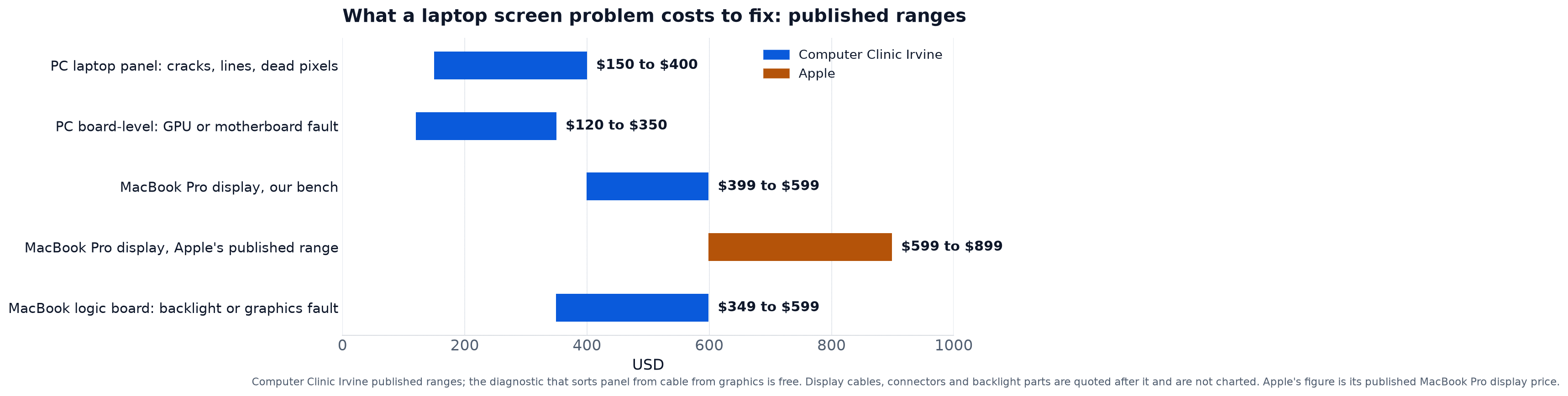
Every published range in this post, on one chart.
| Fix | Our bench |
|---|---|
| PC laptop panel (Dell, HP, Lenovo, ASUS, Acer) | $150 to $400 depending on the panel |
| MacBook Pro display | $399 to $599, against Apple's published $599 to $899 |
| MacBook Air and older MacBook displays | Quoted per model |
| Display cable, connector, or backlight part | Quoted at the diagnostic |
| PC board-level: GPU or motherboard fault | $120 to $350 depending on the fault |
| MacBook logic board: backlight or graphics fault | $349 to $599, against $800 to $1,500 for a whole board elsewhere |
| Driver or software fix | Most laptop repairs $89 to $299 |
The laptop and MacBook screen repair page carries the screen rows above with a turnaround for each, and the written quote is built from it. iMac screens depend on parts and are often next day; they are on the iMac repair page. Every screen leaves with a warranty on parts and labor.
Is It Worth Fixing?
The rule at the counter: if the screen quote is under half of what the working device is worth, fix it. A $400 panel on an eight-year-old laptop worth $200 does not clear the bar, and we will say so.
What the working machine is worth is written up for both platforms: what a broken laptop is worth and what a broken MacBook is worth. If the math says do not fix it, we buy used and broken devices, and the offer goes toward whatever replaces it.
Bringing It In
Bring the laptop and its charger, say at drop-off what the tests showed, and leave the login or set up a guest account, since we need a desktop to see the fault.
We are at 18021 Sky Park Cir Suite H2, Irvine, CA 92614, open Monday to Friday 9 to 6 and Saturday and Sunday 10 to 4, walk in, no appointment. The free diagnostic confirms which part failed, the written quote for your exact model follows, and nothing starts until you approve it. Students: show a valid college ID and the student discount applies at drop-off.
Frequently Asked Questions
Find Out Which Part It Is Before You Buy One
Panel, cable, or graphics: the diagnostic sorts them and the quote is in writing.
Walk in, no appointment
Call or Text
(657) 321-9934
Visit Us
18021 Sky Park Cir Suite H2
Irvine, CA 92614
Mon to Fri 9 AM to 6 PM, Sat and Sun 10 AM to 4 PM | Free Diagnostic