The Fall-Quarter Laptop Checklist: Ten Things to Do Before Midterms
You have a laptop, a phone, and about ten weeks until finals. UCI instruction started September 24 and ends December 4, with finals December 5 to 11. Somewhere in that stretch a battery, a hard drive, or a cup of coffee is going to try to take a week away from you. This checklist is the one evening of work that stops it. Every fix is priced from our published ranges, before the college ID discount, and the planned fixes are same day in most cases (screens same or next day), so tell us your deadline at drop-off.
Written from the bench at Computer Clinic Irvine, about ten minutes from UCI. It pairs with our student laptop repair page and our laptop repair cost guide. If you are on a semester campus, you are already weeks in. Same list, do it this week.
Something Already Wrong With It?
Bring it in now, in week two, not in week ten. Walk in, no appointment. The diagnostic is free, the quote is in writing before any work starts, and the college ID discount comes off at drop-off when you show the ID.
Table of Contents
Why Now: The Quarter Calendar
UCI's fall quarter began September 21. Instruction started September 24 and ends December 4. Finals run December 5 to 11. Thanksgiving week, with November 26 to 27 off, is the last quiet stretch before finals. Winter instruction begins January 4.
Do the list in week one or two, when nothing is due. Skip it and the same problems show up in week ten, when everything is due. A MacBook battery that reads below 80 percent in September is a laptop that shuts off mid-lecture in November. A spinning hard drive that feels slow in September is a drive that can quit in December, and at that point it is not a $199 upgrade, it is data recovery with a deadline attached.
The planned fixes, batteries, the SSD upgrade, and malware removal, are same day. The emergencies they prevent are not. Board-level work runs 2 to 5 business days no matter what week it is, and in finals week you do not have days.
The Ten-Point Checklist
In order. The first four save you in finals week; the rest are habits and the phone. A price only applies if the check turns up a problem.
- Back up tonight, and verify it completed. Pick a cloud service or an external drive, run the backup, then open it and confirm your files are in there and the date is today. A backup that never finished is the one people find out about after the drive is dead. If the drive is failing and the backup will not complete, stop and bring it in: in-house data recovery runs $149 to $799, with a free evaluation first.
- Check battery health on the laptop and the phone. iPhone: Settings, Battery, Battery Health & Charging, and read Maximum Capacity. A reading below about 80 percent, or any message about significant degradation, means the battery is at the end of its useful life. If you have active AppleCare+ and the battery is below 80 percent, Apple replaces it free, so go do that. Otherwise an iPhone battery is $69 to $89, 30 to 60 minutes while you wait. MacBook: System Settings, Battery. A battery below 80 percent capacity or flagged for service is worth replacing, $149 to $209, same day. Windows laptop: if it cannot last one class on a full charge, bring it in for a written quote.
- Check free space, and find out what kind of drive you have. Keep free space on the drive; a full drive is slow and updates fail on it. If the laptop is a few years old, boots slowly, and you can hear it working, it has a spinning hard drive, which is the usual reason an older laptop feels slow. The SSD upgrade (500GB to 1TB) is $199 to $249, same day.
- Run the OS updates now. Plug in, start the update, and let it finish and restart. Install the security and point updates. If the machine offers a whole new version of macOS or Windows, hold that until winter break unless a class requires it; a version jump is what breaks course software mid-quarter. Do it in week one or two, not the night before an exam, because an update is the one thing on this list that can take a working laptop down for an evening. If the update fails, or the laptop will not start after it, that repair falls in the $89 to $299 range that covers most laptop problems, same or next day.
- Inspect the charger, the cable, and the port. Look at the cable where it meets both plugs for fraying. Shine a light into the port and look for lint; backpacks pack it in. If you see lint, do not dig at it with anything metal; a wooden toothpick, gently, or bring it in and we will take a look. A frayed cable fails without warning, so replace it now, with one rated for your charger's wattage from a brand you have heard of, not the cheapest one at the register. A port that only charges at one angle is on its way to not charging at all; bring it in before it quits; most other laptop problems run $89 to $299, same or next day, and you get a written quote first.
- Protect the screen and the hinge. Carry the laptop in a sleeve. Lift it by the base, not the screen. Never close the lid with anything on the keyboard, earbuds and pens included; that is how a laptop screen cracks without a drop. A PC laptop screen runs $150 to $400, same or next day. MacBook screens are quoted for your model at the free diagnostic.
- Keep drinks off the desk. Put them on a shelf next to the desk, not on the surface the laptop sits on. If one does go over, see Liquid below: power off, unplug, no rice, in today.
- Treat slow plus pop-ups as malware. A laptop that got slow and started showing pop-ups after you installed cracked software, or a free copy of something that is not free, is a malware case, not a slow laptop. Stop typing passwords into it. Virus and malware removal is $89 to $149, same day.
- Case and screen protector on the phone, now. Then check its battery with the menu path in item 2. If the screen goes anyway, prices are under Cracked screen below.
- Know the shop before you need it. Computer Clinic Irvine is at 18021 Sky Park Cir Suite H2, Irvine, CA 92614, near John Wayne Airport. From UCI it is about 10 minutes: north on Jamboree, left on Main St. Irvine Valley College is about 12, Concordia and Orange Coast College about 15, Chapman and Saddleback about 20. Hours are Mon-Fri 9 AM to 6 PM, Sat-Sun 10 AM to 4 PM. Walk in, no appointment, free parking right at the door. Bring your school ID and the discount comes off the quote at drop-off. Save the number now: (657) 321-9934.
The Checklist, Priced
Each planned fix on the list, next to the emergency that skipping it can become:
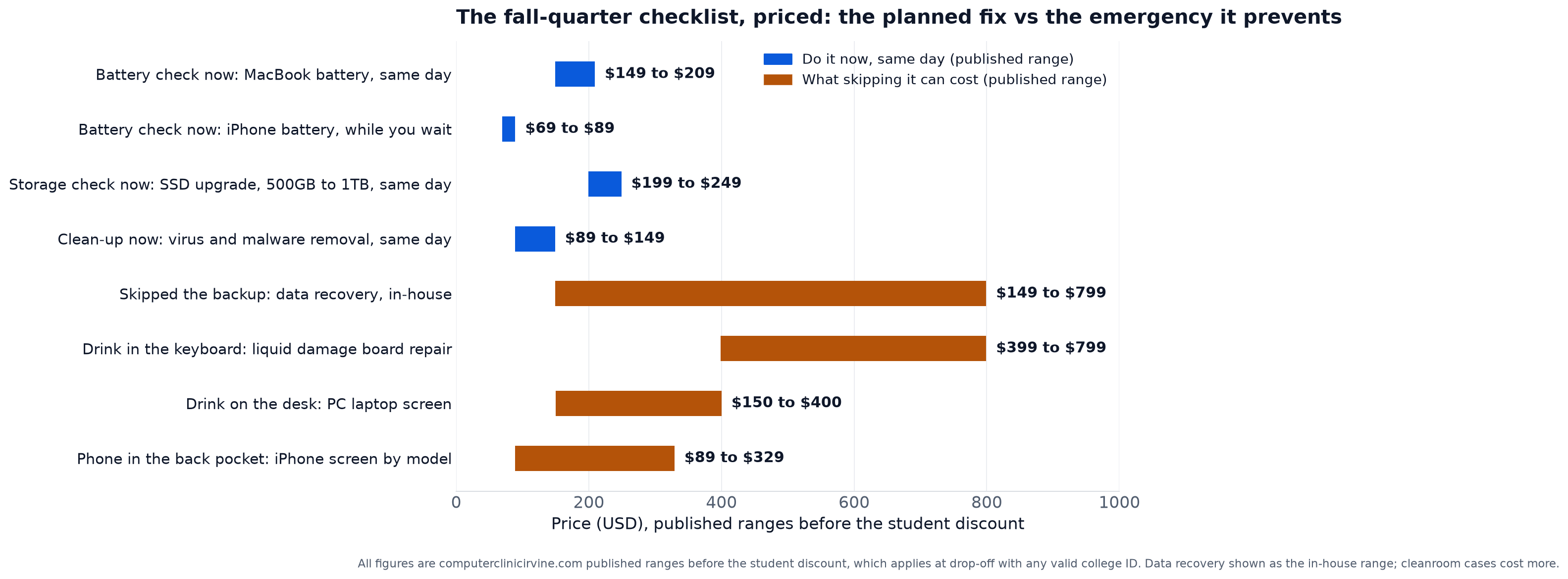
The pattern is the same on every row. Each blue bar stops well below the top of the gold bar it prevents: the SSD upgrade at $199 to $249 against data recovery that runs to $799, a drink kept off the desk against a $399 to $799 liquid damage board repair. And every blue bar is same day. You drop it off between classes and pick it up after.
If Something Already Failed
Skip the list and go by symptom.
It will not turn on
Charge it for a while on a charger you trust, then try once. If nothing, stop pressing the button. For a Mac, work through our MacBook not turning on guide. For a desktop with a black screen, use the PC turns on but no display guide. For a Windows laptop, bring it in; most laptop problems run $89 to $299, same or next day, and if it is the board we say so at the free diagnostic. MacBook logic board repair runs $349 to $599 against Apple's $800 to $1,500, and board-level work takes 2 to 5 business days, so bring this one in the day it happens.
Cracked screen
A PC laptop screen runs $150 to $400, same or next day. iPhone screens go by model: X through 13 is $89 to $189, 14 and 15 including Pro is $169 to $329, both 30 to 60 minutes while you wait. A cracked screen that still works gets worse in a backpack, so fix it now. Our screen replacement cost guide covers every device type.
Liquid
Power off immediately. Unplug. Do not charge it. Do not put it in rice. Bring it in today, not after the weekend. iPhone water damage recovery runs $199 to $399. MacBook liquid damage chip-level repair runs $399 to $799. The full walkthrough is on our liquid damage repair page. A laptop that still works after a spill is on a countdown; bring that one in too.
Slow
If it is slow and there are no pop-ups, it is the drive. The SSD upgrade (500GB to 1TB) runs $199 to $249, same day. Details on our hardware upgrades page. If it is slow with pop-ups, see item 8 above: virus and malware removal, $89 to $149, same day.
Files on a dead drive
Stop powering it on to see if it comes back; each attempt on a failing drive can cost files. In-house data recovery runs $149 to $799: logical recoveries $149 to $349, SSD and NVMe controller failure $399 to $799, and cleanroom head work through a partner lab $1,000 to $2,500. Start at our data recovery page.
Fix it or sell it?
If the quote makes you wonder whether the laptop is worth it, ask; we answer that at the counter. For a Mac, what is my broken MacBook worth walks through when a small repair raises the sale price by more than it costs, and when a dead Mac still has value to a board-level shop.
When to Do What
The quarter, laid out against the list. UCI dates; semester campuses swap in their own.
| When | Do | Why |
|---|---|---|
| Week 1 to 2 (now) | The full checklist | One evening, nothing is due, and the fixes it turns up are same or next day |
| Midterms (whenever yours land) | Recheck battery health, run updates, back up | Anything borderline in September shows it by now, while there is time for a same-day fix |
| Thanksgiving week (Nov 26 to 27 off) | The last calm window: SSD upgrade or battery, same day, earlier in the week | Finals start a week later. Anything that needs the machine on the bench for a day happens now or not at all |
| Finals, Dec 5 to 11 | Back up daily, do not update the OS, bring failures in the same day | A daily backup means a dead laptop costs you a machine, not a paper. An update can cost an evening you do not have. Same-day drop-off keeps your options open |
| Winter, instruction Jan 4 | Run the list again | Ten weeks of use, a break spent traveling, new deadlines. Same evening, same payoff |
The advice at the counter is the same in week two and week ten: what you fix on your schedule costs less than what fails on its own.
About Ten Minutes From UCI, Walk In Between Classes
MacBook battery $149 to $209. SSD upgrade $199 to $249. iPhone battery $69 to $89. Same day in most cases, before the college ID discount, with our warranty on parts and labor.
Located at 18021 Sky Park Cir Suite H2, Irvine, CA 92614
Frequently Asked Questions
Do the List This Week. Bring Us Whatever It Finds.
Same-day batteries, SSD upgrades, and malware removal, screens same or next day, all priced in writing before the work starts, about ten minutes from UCI.
Serving Irvine and all of Orange County
Call or Text
(657) 321-9934
Visit Us
18021 Sky Park Cir Suite H2
Irvine, CA 92614
Mon-Fri 9 AM to 6 PM, Sat-Sun 10 AM to 4 PM | Free Diagnostic | Student Discount With Any College ID