Motherboard Repair vs. Replacement: The Real Math
"The motherboard is bad" is where most repair conversations end. The shop shrugs, quotes a number close to the price of a new machine, and the device goes in a drawer. What almost nobody explains is that a "bad motherboard" is usually one failed component on an otherwise healthy board, and that the choice between repairing it and replacing it has real math behind it.
This guide walks that math with our published prices on one side and the replacement path on the other. It comes from the micro soldering bench at Computer Clinic Irvine, where our lead technician has spent 12+ years doing component-level board repair. It also tells you when replacement is the better move, because sometimes it is.
Told Your Motherboard Is Dead?
Get a second opinion before you pay for a new board or a new machine. The diagnostic is free.
Table of Contents
What Actually Fails on a Motherboard
A modern motherboard carries hundreds of components, but failures cluster in a handful of places. When a board "dies," it is almost never the whole board. It is one of these:
- Power circuitry. MOSFETs, power management ICs, and voltage regulators take the most stress and fail the most often. The symptom is a device that is completely dead or that starts and immediately shuts off.
- Charging circuits. A bad charging IC or a damaged charge port circuit makes a healthy device look dead because the battery simply never fills.
- Physical ports. USB-C, HDMI, and charge ports get yanked, bent, and worn. The port itself is a small soldered component, not a reason to condemn a board.
- Liquid corrosion. A spill leaves conductive residue that eats traces and shorts components. Caught early, it cleans up; left for months, it spreads.
- Cracked solder joints and traces. Drops and flexing crack the tiny connections between components and board. Invisible to the eye, findable under a microscope.
- Corrupted firmware chips. A failed BIOS or firmware update can leave a perfectly healthy board refusing to start. The fix is reprogramming or replacing one chip.
The component that failed usually costs a few dollars. What you are paying for in a board repair is not the part. It is the diagnosis, the equipment, and the hands that can replace a chip smaller than a grain of rice without disturbing its neighbors.
The Cost Math, Charted
Here are our published board repair prices next to what the replacement path costs for the same failure. Every repair number is on our repair prices page, so you can hold us to them.
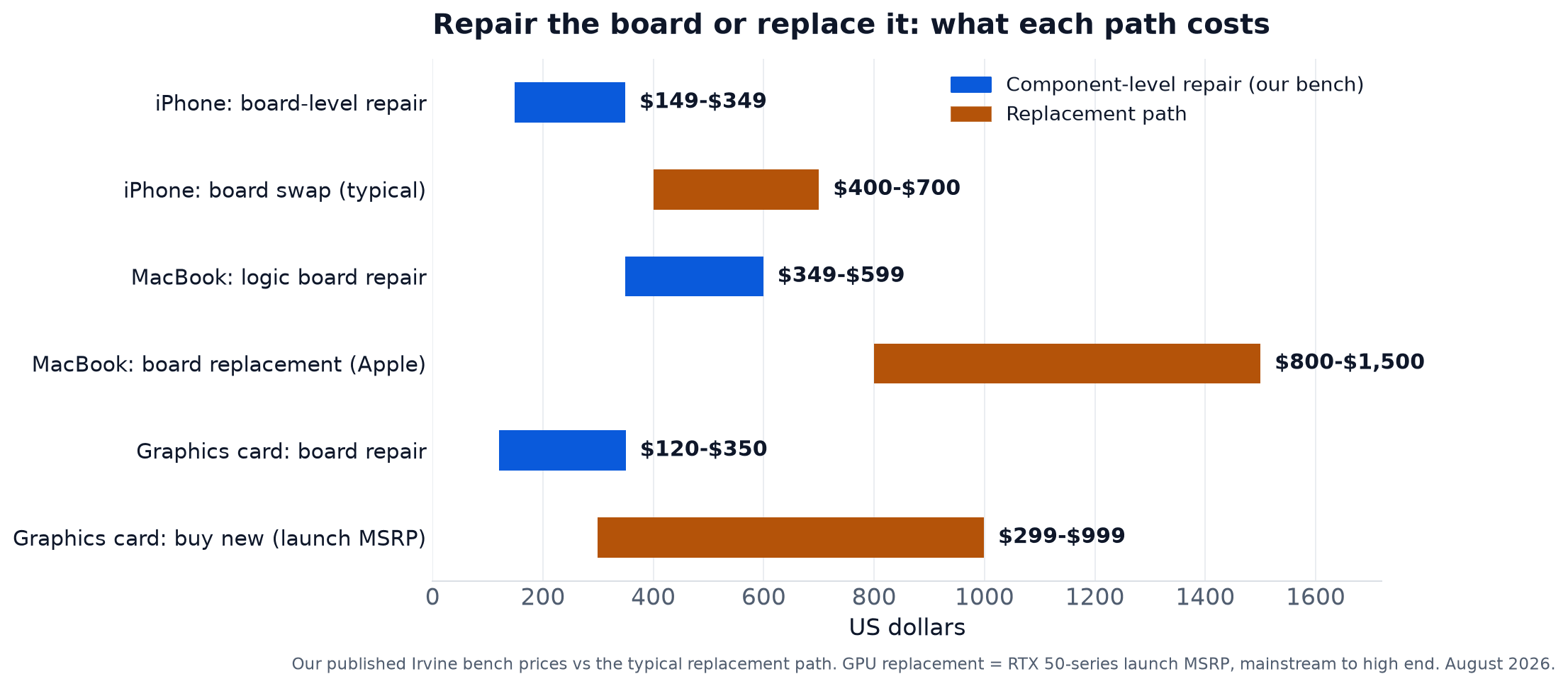
The pattern is consistent: the replacement path costs roughly two to three times the repair, and on MacBooks the gap is widest because Apple only offers whole-board replacement. Desktop PC motherboards are the deliberate exception, and they get their own section below, because for desktops the math often flips.
| Board | Component-Level Repair | Typical Turnaround |
|---|---|---|
| iPhone board | $149 to $349 | 2 to 5 days |
| MacBook logic board | $349 to $599 | 2 to 5 days |
| Graphics card (GPU) | $120 to $350 | 1 to 7 days by fault |
| Desktop PC motherboard | Quote after free diagnostic | Depends on the failure. Often a new board is the better buy. |
When Replacement Honestly Wins
A repair shop that says repair is always the answer is selling you something. Here is when it is not:
- Desktop PCs with standard boards. A consumer ATX or micro-ATX motherboard is a commodity part with a standard socket, sold everywhere. When a new equivalent board costs a couple hundred dollars and swaps in without special tools, replacement is often the smarter buy. We tell desktop customers this at the free diagnostic instead of selling them bench hours.
- Widespread liquid corrosion. One corroded area cleans up and repairs well. A board where liquid sat for months and corrosion has spread across multiple circuits can become an archaeology project. At some point the honest quote is "this board is not worth saving, let's talk about your data."
- Repair cost near half the device's value. The same rule we apply to every repair: if fixing the board costs more than about half of what the working device is worth, put the money toward the replacement instead. We will tell you which side of the line you are on.
When Repair Wins by a Mile
Everything that makes desktop boards replaceable is missing on laptops, MacBooks, iPhones, and graphics cards. These boards are proprietary, priced near the device's value, and in Apple's case not sold to you at all, only installed as a service. That changes the math completely:
- The replacement board costs almost as much as the device. An $800 to $1,500 board swap on a MacBook worth $1,100 is not a repair, it is a ransom. A $349 to $599 component repair on the same machine is a decision that makes sense.
- Apple will not repair boards, only swap them. If the failure is one chip, the swap price does not care. Component-level repair prices the actual failure. See our Mac repair page for how that plays out across models.
- Older devices lose the replacement option entirely. Once a device goes vintage or the board is out of production, replacement stops being available at any price. Repair is the only path that keeps those machines alive.
- Graphics cards sit in the same trap. A dead GPU with one failed MOSFET is a $120 to $350 bench repair standing between you and a new card that listed at $299 to $999 at launch, before street markup. Details on our graphics card repair page.
The Part Nobody Mentions: Your Data Lives on That Board
On every modern MacBook and iPhone, and a growing number of Windows laptops, storage is soldered directly to the motherboard. There is no drive to pull out. Which means:
A board replacement is also a data wipe. The old board leaves with your files on it. If your backup was not current, the replacement path quietly costs you everything since the last one. A component-level repair keeps the original board, so your data never goes anywhere.
Even when a board is too far gone to save, board-level skills are what make data recovery possible: powering a dead board just long enough to pull the files, or moving storage chips to a working donor. If the quote you got elsewhere was "new board, data gone," that is not the end of the story.
Get the Actual Failure Diagnosed First
Before you accept a whole-board quote, find out which component actually failed. Free diagnostic, and you approve the price before any work starts.
Call (657) 321-9934What Board-Level Repair Looks Like on the Bench
"We repair motherboards" is easy to print on a sign. Here is what the work actually involves, so you know what to ask any shop:
- Diagnosis against the schematic. We work from board schematics and boardview files for the exact board, measuring voltages line by line until the failed component is identified. Not guessing, measuring.
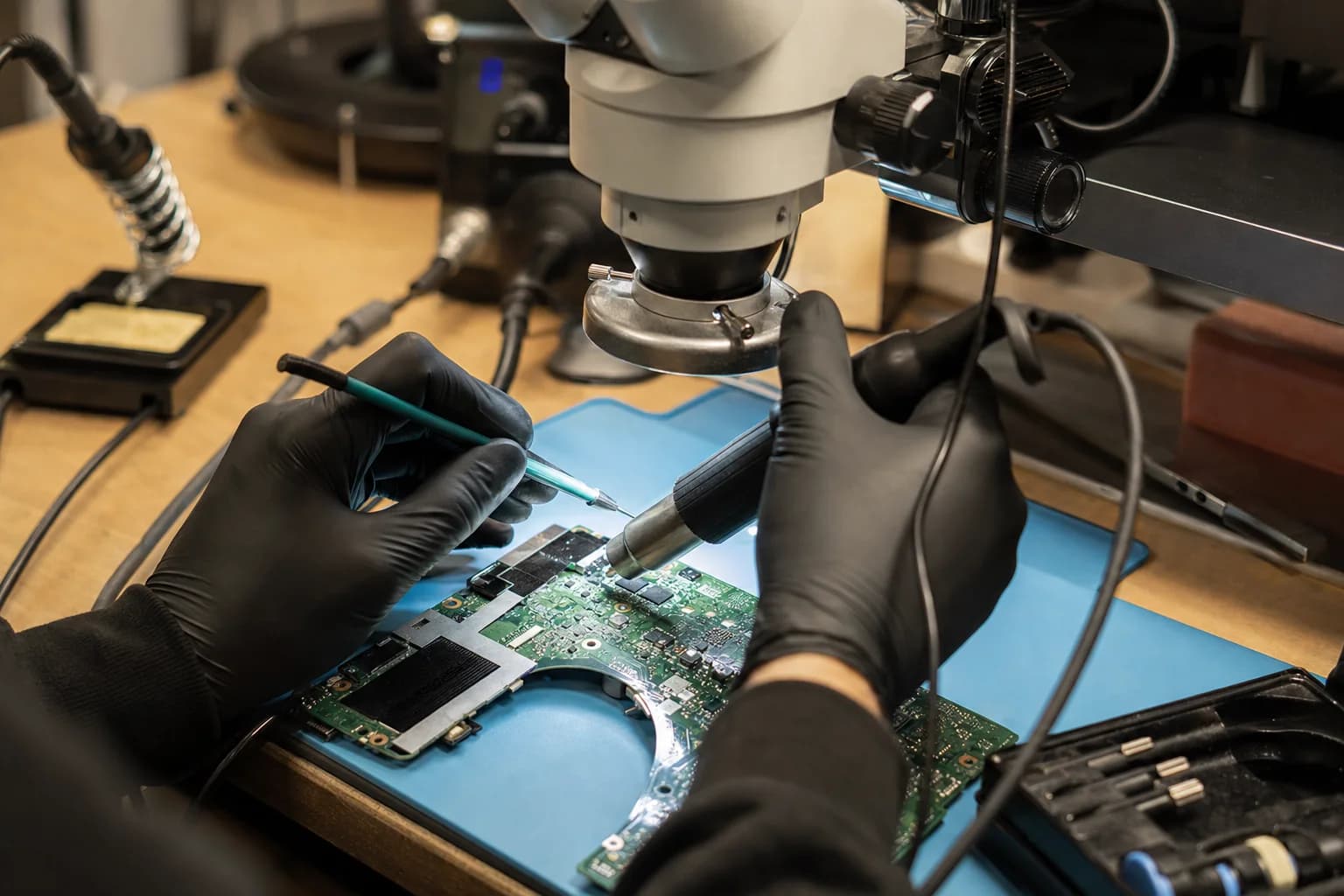
- Rework under the microscope. The failed component comes off with hot air or a soldering iron under magnification, the pads get cleaned, and a replacement goes on. Some chips have connections underneath the package, which is where the specialized equipment earns its keep.
- Verification before the phone call. The board goes back together and gets tested under real load, current draw monitored, before we tell you it is fixed.
That is why board-level work takes 2 to 5 days, not an afternoon. If you want to see the process on a real ticket, we documented one chip by chip: the A2991 MacBook Pro board repair case study, a 2023 machine that arrived dead with high current draw. And if the board took a swim first, start with our liquid damage repair page, because cleaning comes before any repair promises.
How to Decide in Five Minutes
Five questions, in order. They settle almost every board case:
- Is the device a desktop PC with a standard board? If yes, price a replacement board first. Repair only wins here in special cases, and a good shop will say so.
- Is there data on it that is not backed up? If yes, repair (or recovery) is the only path that protects it. A board swap is a wipe.
- What is the working device worth? Check what your model sells for used. Keep that number in mind when the quotes come in.
- Is the repair quote under half that value? Under half: repair comfortably wins. Near half: judgment call. Over half: put the money toward replacement.
- Has anyone actually diagnosed the failure? "Bad motherboard" from a shop that does not do board-level work means "we don't repair these." Get the free diagnostic before treating that as a verdict.
If you are anywhere near Irvine, the five minutes can happen at our counter. Bring the device to our micro soldering bench, the diagnostic is free, and you will leave knowing which component failed and what both paths cost.
Get the Board Diagnosed, Not Guessed At
Walk in with the device. Walk out knowing which component failed, what the repair costs, and whether we would repair it if it were ours.
Located at 18021 Sky Park Cir Suite H2, Irvine, CA 92614
Frequently Asked Questions About Motherboard Repair
Don't Bury a Board Over One Dead Chip
Most "dead" motherboards have one failed component and years of life left.
Free diagnostic, exact quote before any work, and both paths priced side by side
Call or Text
(657) 321-9934
Visit Us
18021 Sky Park Cir Suite H2
Irvine, CA 92614
Mon-Fri 9 AM to 6 PM, Sat-Sun 10 AM to 4 PM | Free Diagnostics | 12+ Years Technician Experience