What WiFi Installation Costs in Orange County: Router Setup, Mesh, and Whole-Home Coverage
Router setup and configuration starts at $89 in labor. Whole-home mesh WiFi installation runs $199 to $499 depending on home size and node count, and a multi-story install with outdoor access points runs $399 to $899. Equipment is separate on every one of those lines. A Cox or Spectrum technician charges $50 to $100 to bring the line in and connect one gateway (Frontier's fiber page shows installation included, with a $50 fee in the fine print for some new customers). That is a different job, and most of the confusion about WiFi installation cost comes from comparing the two numbers as if they bought the same thing.
Computer Clinic Irvine does these installs on-site across Irvine and Orange County, and two of them are written up in detail on this blog: an Orbi 970 rebuild on a large Irvine property and a guide to what coastal Newport Beach homes need. The $89 and $199 to $499 figures below are the same ones on our network setup page; the larger-home range comes from our published install write-ups. Nothing here is a special rate.
Want the Number for Your Home?
The walkthrough is free and happens at your address. Call for the next available on-site slot, or send the square footage, number of floors, and where the WiFi dies and we will start from there.
Table of Contents
- 1. The Short Answer: What We Charge
- 2. Our Labor vs an ISP Hookup, Charted
- 3. What Cox, Spectrum, and Frontier Charge, and What You Get
- 4. What Moves the Price
- 5. Equipment: Bring Your Own or We Source It
- 6. What the Install Visit Looks Like
- 7. Do You Need Mesh, or Just a Better Router Setup?
- 8. Frequently Asked Questions
The Short Answer: What We Charge
These are the labor prices published on our network setup page, our home network pages for Orange County, Costa Mesa, and Laguna Beach, and the Newport Beach and Orbi 970 install write-ups. The price follows the job, not the city.
| Job | Labor | What it usually is |
|---|---|---|
| Router setup and configuration | from $89 | One router or ISP gateway, set up or replaced |
| Mesh, 2 to 3 nodes, one or two floors, no outdoor work | $199 to $499 | Single story with 2 nodes at the low end, two floors or tougher walls toward the top |
| Multi-story mesh with outdoor access points | $399 to $899 | Two or more floors plus patio or yard coverage, outdoor-rated hardware mounted. Homes needing 4 to 5 nodes or a detached structure are quoted after the walkthrough |
| Business or multi-floor office | Quoted on-site | Small office WiFi and multi-access-point installs, priced on the space |
Equipment is separate on every row. Section 5 covers buying it yourself or having us source it.
Plan on 2 to 3 hours on-site for the install itself. Larger jobs (4 to 5 nodes, multi-story, outdoor coverage) get their exact number after the walkthrough.
Our Labor vs an ISP Hookup, Charted
Searches for WiFi installation cost turn up two very different kinds of number. Here they are side by side:
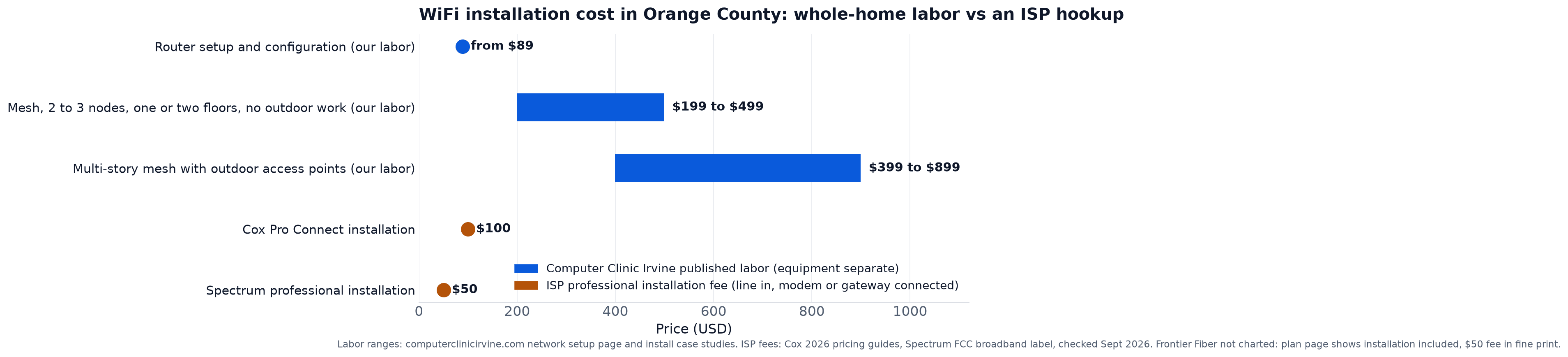
The gold points sit below the blue bars, and it is tempting to read that as the ISP doing the same work for less. It is not the same work. An ISP professional install pays for bringing the line into the house, connecting the modem or gateway, and confirming the connection is live at that box. Coverage planning for the rest of the house, mesh placement, and ethernet runs are not part of that fee. The blue bars pay for the part of the job that starts where the ISP visit ends.
What Cox, Spectrum, and Frontier Charge, and What You Get
We checked each provider's own published documents in September 2026. Here is what they say, and what each fee buys.
- Cox. Cox's 2026 regional Product and Pricing Guides list Pro Connect at $100.00, Easy Connect Activation at no charge, and a Pro Connect Conversion at $100.00. The conversion line means a self-install that ends up needing a technician is billed at $100.
- Spectrum. Spectrum's FCC broadband label for its Internet Premier plan lists Professional Installation at $50.00 and Service Activation at $20.00 as one-time fees. The same label lists two provider monthly fees: Optional WiFi Service at $10.00 a month and Optional Invincible WiFi at $30.00 a month. That $10 a month WiFi line is $120 a year.
- Frontier Fiber. Frontier's fiber plan page shows installation included on its fiber tiers, while the fine print on the same page says a $50 expert installation fee applies for new residential customers under certain conditions. Which of those applies to your address is a question for Frontier; the page does not settle it.
For a one-story house or a condo where the gateway sits somewhere central, that $50 to $100 Cox or Spectrum install is often the whole job.
It stops being enough when the gateway's signal does not reach where you use it: a far bedroom that drops video calls, a second floor above a garage, a patio where the outdoor camera keeps going offline, a detached office. None of that is a fault in the ISP visit; the fee was for the connection at the box.
What Moves the Price
Every range in the table has a low end and a high end. These are the things that push a job from one toward the other.
- Square footage and floors. More area and more floors mean more nodes, more places to test, and more mounting. Single story with 2 to 3 nodes is the bottom of the range; two floors with outdoor coverage is the $399 to $899 row.
- Construction. Thick stucco, walls full of metal ductwork, and tile all block signal that would pass through drywall. Two homes with the same floor plan can need different node counts because of what the walls are made of.
- Node count. The rule of thumb we use: a 3-pack covers up to about 3,300 sq ft well in a standard layout. Homes over 4,000 sq ft, thick stucco, two-story canyon homes, or detached structures (a casita, guest house, or garage office) typically want 4 to 5 nodes. The real number depends on layout and construction, which is why the walkthrough comes before the quote.
- Wired backhaul and ethernet runs. On a larger property, the link between nodes can be the weak point. Wired backhaul means running ethernet between them, and pulling cable through an attic or a wall is labor a plug-in-and-pair install does not have.
- Outdoor coverage. Covering a patio, pool deck, or yard usually means an outdoor-rated access point mounted outside. Outdoor-rated units cost more than indoor ones because they are built for weather, with sealed housings, and mounting one is more work than setting a node on a shelf.
- The state of what is already installed. If you have a mesh system but no longer have the admin credentials or app account, new satellites cannot be added and settings cannot be changed. The fix is a factory reset of every node and a clean rebuild, which is what the Orbi 970 case came down to. A rebuild takes longer than adding a node to a system you control.
Equipment: Bring Your Own or We Source It
Every price in this guide is labor. The router or mesh kit is a separate line, and you have two ways to handle it: buy it yourself after the walkthrough and have it waiting for the install, or have us source it. If you already own a system, we work with what you have, provided it can be managed.
Where equipment money goes wrong is usually placement, not brand. The mistakes we see most often on installs someone else did:
- Nodes too close together. Two nodes covering the same rooms add no coverage; the far rooms are still dark.
- Nodes too far apart. The link between them is weak, so the whole mesh slows down and devices roam badly.
- A node behind a wall full of metal ductwork. The signal never gets out of the room it is in.
- Nodes low to the ground. Behind a couch or on a closet floor, where furniture soaks up the signal.
This is also why more nodes is not automatically better. Past a certain density, extra units cause more interference and more roaming confusion, not more coverage. A home with four routers, two extenders, and still a dead zone has a placement problem, not a hardware shortage. The fix is the number of units the layout calls for, placed where the signal meter confirms they belong, before anything is mounted. For the outdoor piece, the Newport Beach guide covers why coastal patios need outdoor-rated hardware; an outdoor-rated Ubiquiti UAP-AC-M is around $179 and is one option we use for exposed locations.
What the Install Visit Looks Like
Here is the sequence from first contact to the last speed test. The walkthrough is its own step and produces the quote: you leave it with a node count and a number. You buy the kit, or we source it, and the install that follows is the 2 to 3 hours on-site. If you already own the kit, the walkthrough confirms whether it is the right size for the house before anything is mounted.
- Walkthrough. We see the layout, ask where you use the internet and where it fails, and note the construction: stucco, tile, ductwork, floors. This is the free step that produces the quote, and it happens before you buy anything.
- Signal survey. With a signal meter, we check what the existing gateway or mesh delivers in each room and outdoor zone. Readings between -75 and -85 dBm are where modern devices stop working reliably; those rooms are the dead zones.
- Placement. Each node goes where the meter says it should, not where the outlet happens to be. Candidate spots are tested for both coverage into the weak area and a strong link back to the previous node.
- Mounting. Once placement is confirmed, nodes are mounted or set in their final positions, and outdoor-rated units go up outside if the job includes them.
- Configuration. One unified network name across all bands and nodes so devices roam between them on their own. WPA3 on. Legacy 802.11b disabled where possible. The system is set up under your account so you own it going forward.
- Verification. Coverage tested in every room and outdoor zone. Roaming confirmed node to node as we walk the property. Internet speed checked at every mesh point, not just next to the router.
Save the admin credentials somewhere you control when the visit is done. Losing them is why an existing mesh sometimes has to be reset and rebuilt later, which is what the Orbi 970 job came down to.
Do You Need Mesh, or Just a Better Router Setup?
Not every WiFi problem is a coverage problem. Before paying for mesh, ask whether the $89 router setup is the whole fix.
The router path fits when the house is within one router's reach but the router is set up badly: an ISP gateway left on defaults, a good router still in the box, or a gateway in a corner of the garage because that is where the line came in. Setting up or replacing that one router or gateway starts at $89 in labor. If the signal survey shows the whole house within a usable range from one well-placed router, that is the job.
Mesh fits when the survey shows rooms or outdoor zones no single router placement can reach. The node-count rule in section 4 then picks the row: a 3-pack home is the $199 to $499 row, and coverage that has to reach outside, or a home that needs 4 to 5 nodes, is the $399 to $899 row or a quote after the walkthrough. A two-story home inside the 3,300 sq ft rule of thumb, with no outdoor coverage, is usually a 3-node job in the $199 to $499 row; it moves up if it needs a fourth or fifth node or an outdoor unit.
The walkthrough settles this before you spend anything on hardware, and a call for mesh that ends as an $89 router setup is a fine outcome. The full service page is at WiFi and network setup in Irvine, with the Orange County version at home network installation, Orange County.
Get a Real Number After a Free Walkthrough
Router setup from $89, mesh $199 to $499, larger homes quoted on-site. Equipment separate.
Located at 18021 Sky Park Cir Suite H2, Irvine, CA 92614
Frequently Asked Questions About WiFi Installation Cost
One Walkthrough, One Real Number
Router setup, mesh, or whole-home coverage, priced on your house after we have seen it.
On-site across Irvine and Orange County
Call or Text
(657) 321-9934
Visit Us
18021 Sky Park Cir Suite H2
Irvine, CA 92614
Mon-Fri 9 AM to 6 PM, Sat-Sun 10 AM to 4 PM | Free On-Site Walkthrough | 12+ Years Technician Experience