Graphics Card Repair or Replace? What a Dead GPU Really Costs
A graphics card dies and the internet has one answer: buy a new one. That answer costs $299 to $1,999 at launch MSRP, and street prices usually run higher. What the internet skips is that most dead GPUs have one failed component on the board, and that component can be replaced for a fraction of any of those numbers.
This guide is the decision most PC owners never get to make because nobody offers them the repair option. It covers how cards actually die, what each symptom points to, what repair costs next to replacement, and the cases where a new card is the better buy. It comes from the bench at Computer Clinic Irvine, where board-level graphics card repair is everyday work.
Dead or Glitching GPU?
Bring the card or the whole PC. The diagnostic is free, and you get a written quote before any work.
Table of Contents
How Graphics Cards Actually Die
Almost every GPU death traces back to heat, and heat kills in predictable ways:
- Cracked solder under the die. Years of heat cycles (hot under load, cool at idle, thousands of times) flex the board until solder connections under the GPU die crack. The fix is a reflow or reball, which is exactly what it sounds like: remaking those connections.
- Failed power delivery. The VRM stage that feeds a modern GPU runs hard. When a MOSFET or inductor lets go, the card goes dark instantly, and often the rest of the board is fine.
- Failing VRAM. Memory chips degrade with heat too. Bad VRAM shows up as artifacts, crashes in games, or a card that will not complete boot.
- Dead fans and dried thermal interface. Fan bearings wear out, paste dries, pads crumble. The card then cooks itself, which accelerates every failure above. Caught early, this is the cheapest fix on the list.
- Connector and port damage. Bent DisplayPort pins, a cracked HDMI jack, or a melted power connector. Physical damage with a physical fix.
Notice what is not on the list: the GPU core itself just wearing out. A dead core does happen, and when it does the card is done. But it is the least common verdict at our bench, and the free diagnostic tells you which case you have before you spend anything.
What Each Symptom Points To
| Symptom | Usual Suspects | Typical Fix |
|---|---|---|
| Fans spin, no display | Power delivery, VRAM, or die solder contact | Component replacement or reflow |
| Artifacts: colored squares, lines, texture glitches | Failing VRAM or an overheated core losing contact | VRAM replacement or reball, plus fresh thermal work |
| Crashes under gaming load | Overheating, VRAM errors, or VRM stress | Thermal service first, board-level if errors persist |
| Grinding or dead fans, thermal throttling | Worn fan bearings, dried paste, crumbled pads | Fan replacement and cooler rebuild |
| No power at all: no fans, no lights | Blown MOSFET or inductor, damaged power connector | Power-stage component replacement or connector rebuild |
| One monitor output stopped working | Cracked or burnt HDMI / DisplayPort jack | Port repair or replacement |
One caution before you condemn the card: "no display" is also the classic symptom of a motherboard, RAM, or power supply problem. We bench-test the card in a known-good system and your system with a known-good card, so nobody replaces the wrong part. If the board turns out to be the culprit instead, our motherboard repair vs. replacement guide walks that decision.
Repair vs. New Card: The Price Gap
Our board-level GPU repairs run $120 to $350 depending on the fault. Fan and thermal jobs sit at the low end; VRAM, power-delivery, and reball work runs higher. Here is that range next to what a new card costs:
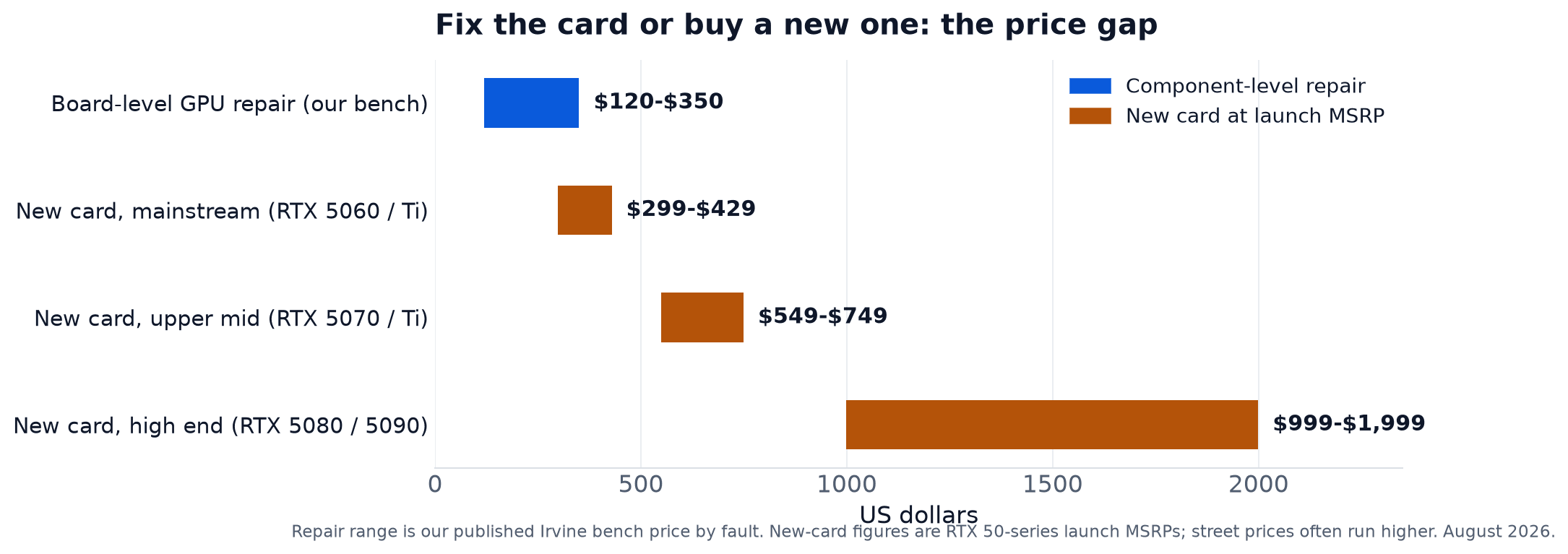
The math gets more lopsided the higher up the stack your card sits. A $200 repair on a mainstream card is a judgment call. The same $200 repair on a card that costs $749 to $1,999 to replace is barely a question, which is why the section below starts with the cheap cards.
When a New Card Is the Right Call
- The card is under manufacturer warranty. RMA it. Do not pay anyone, including us, for a repair the manufacturer owes you free. We check this at the diagnostic and send you to the warranty desk when it applies.
- It is an older budget card. If your card sells used for $120 and the repair quote is $150, the math has spoken. Put the money toward something newer.
- The core itself is dead. When the diagnostic shows a failed GPU die rather than a failed supporting component, replacement is usually the only real option.
- You were upgrading anyway. If the card was already too slow for what you play or render, the failure just made the decision for you. Repair only makes sense for hardware you want to keep.
When Repair Wins
- Mid-range and high-end cards, almost always. One blown MOSFET on a card that listed at $549 to $1,999 at launch is a $120 to $350 repair. Replacing that part, or doing a proper reball, can bring a $400 to $800 card back for a fraction of a new one.
- Street prices are above MSRP. The chart shows launch prices; actual shelf prices for current cards routinely run higher, and every dollar of markup widens the repair advantage.
- The failure is thermal or mechanical. Dead fans, dried paste, and crumbled pads are the cheapest faults on the menu and catching them early prevents the expensive ones. There is no version of that math where a new card wins.
- Your card is discontinued and you like it. Some cards are worth keeping: a specific size that fits your case, a model with VRAM the replacement tier skimps on, a card matched to the rest of your build. Repair keeps hardware the market no longer sells.
Find Out Which Case Your Card Is
The free diagnostic isolates the actual fault: GPU, motherboard, RAM, or power supply. You get the verdict and the quote before spending anything.
Call (657) 321-9934What GPU Repair Looks Like on the Bench
- Isolate the fault. The card goes into a known-good test rig, and your system gets tested with a known-good card. This one step is why our customers never pay to replace the wrong part.
- Diagnose the board. Voltage measurements across the power stages, memory testing, thermal imaging under load. The goal is a named component, not a guess.
- Repair under the microscope. Failed MOSFETs, inductors, and VRAM chips get replaced with micro soldering. Cards with cracked die solder get a proper reflow or reball, not the oven trick you saw on YouTube.
- Rebuild the cooling. Fresh paste, new pads, fan service or replacement. Sending a repaired card back with the cooling that killed it would be malpractice.
- Stress test before return. The card runs under sustained gaming-level load until we trust it. You get it back stable, not "it booted once."
The timelines: fan, thermal, and straightforward component repairs take 1 to 3 days. Reball, reflow, and complex board-level work runs 3 to 7 days because careful diagnosis and post-repair testing cannot be rushed. Whole gaming PCs that will not boot or keep crashing are the same bench work; see our custom PC builds and rescue page for build-specific problems.
How to Decide in Five Minutes
- Still under manufacturer warranty? RMA it. Done.
- What does your exact model sell for used, working? That number is your ceiling. Check a sold-listings search, not asking prices.
- Is the symptom thermal? Grinding fans, gradual throttling, crashes that start 20 minutes into a session. If yes, you are probably at the cheap end of the repair range, and waiting will make it worse.
- Would you buy this card again today? If the replacement you want is a different card anyway, repair only wins if the quote is low. If you would buy the same card, repair almost always wins.
- Has anyone bench-tested it? "It must be the GPU" without isolation testing condemns a lot of innocent cards. Get the free diagnostic before spending new-card money.
Get the Card Bench-Tested
Walk in with the card or the whole PC. Walk out knowing what failed, what the fix costs, and whether we would repair it or replace it ourselves.
Located at 18021 Sky Park Cir Suite H2, Irvine, CA 92614
Frequently Asked Questions About Graphics Card Repair
Your Card Probably Is Not Dead
Most "dead" GPUs have one failed component and a lot of frames left in them.
Free diagnostic, written quote, stress-tested before it comes back
Call or Text
(657) 321-9934
Visit Us
18021 Sky Park Cir Suite H2
Irvine, CA 92614
Mon-Fri 9 AM to 6 PM, Sat-Sun 10 AM to 4 PM | Free Diagnostics | 12+ Years Technician Experience